
Should you choose IMAP or POP3 settings?:
- IMAP email access coordinates between the server and your mail application. Messages that have been read/deleted/replied to will show up as such, both on the server and in the mail application.
- POP3 does not coordinate with the server. Messages marked as read/deleted/replied to in the mail application will not show up as such on the server. This means that future mail downloads with POP3 will show all messages as unread.
- Outgoing mail is sent using SMTP.
- We recommend using POP3 over SSL/TLS or IMAP over SSL/TLS since they provide increased security for your interactions with the remote mail server.
The following table represents a sample of how to setup emails. We have used one of our own email addresses. When you setup your email address you will need to change the domain accordingly.
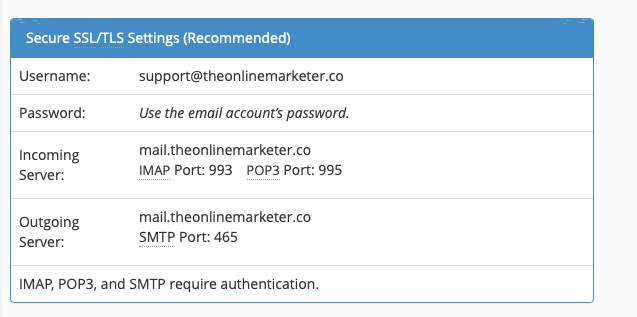
So support@theonlinemarketer.co becomes your own email address. eg info@yourcompany.co.za
Incoming server changes from mail.theonlinemarketer.co to mail.yourcompany.co.za
When setting up your email app such as Outlook or mail please remember that you need to activate SSL and you need to sign in to your email account for both incoming and outgoing mail.
